Managing hundreds of supplier invoices, payment records, and approval requests can strain enterprise finance teams. Manual invoice processing often leads to data-entry errors, delayed payments, and additional administrative work.
AP automation for enterprises helps businesses simplify these tasks through AI-powered tools, digital workflows, and automated verification. It improves invoice accuracy, speeds up approvals, and gives finance teams better control over business expenses.
What is AP automation for enterprises?
AP automation for enterprises uses software to manage accounts payable activities with minimal manual effort. It automates invoice collection, data entry, verification, approvals, and payment tracking.
For example, when a supplier sends an invoice, the software extracts details such as the invoice number, amount, tax, and payment date using Optical Character Recognition (OCR). It checks the information against purchase orders and forwards the invoice for approval.
This reduces repetitive work and helps finance teams manage payments more efficiently.
Why do enterprises need AP automation?
Large businesses often manage thousands of invoices across multiple departments and suppliers. Manual processing increases administrative costs and makes payment tracking difficult.
According to Ardent Partners’ State of ePayables 2025, the average cost of processing an invoice is $9.84, with an average processing time of 8.2 days.
AP automation helps enterprises address these challenges through:
- Faster processing: Automates repetitive invoice-related activities.
- Fewer errors: Reduces manual data-entry mistakes and duplicate invoices.
- Quick approvals: Routes invoices to the right managers.
- Better cash flow: Provides visibility into upcoming payments.
- Improved vendor relationships: Supports timely payments and clearer communication.
How AP automation eliminates manual invoice processing
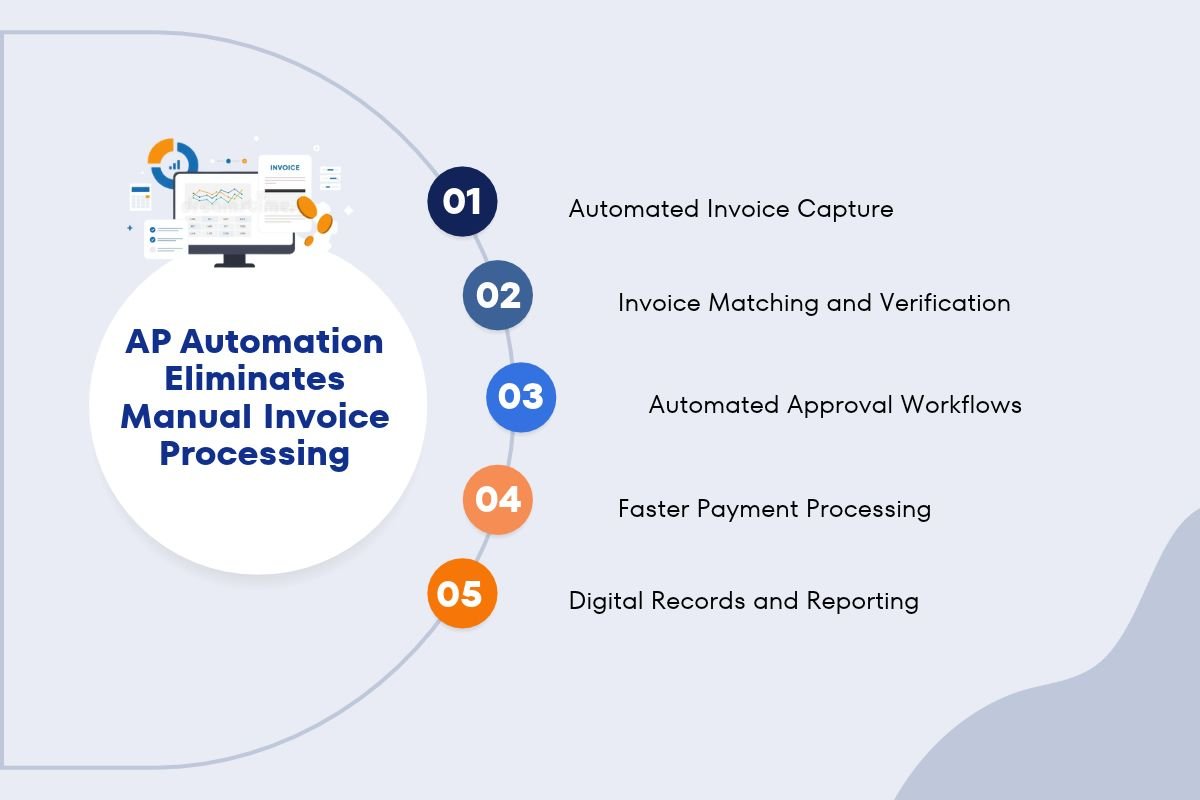
AP automation simplifies the major stages of accounts payable.
1. Automated Invoice Capture: OCR and AI extract important information from digital invoices and scanned documents. Finance teams spend less time entering supplier details, invoice numbers, dates, and payment amounts manually.
2. Invoice Matching and Verification: The software checks invoices against purchase orders and goods receipt records. It identifies differences in pricing, quantities, or other details and flags them for review.
3. Automated Approval Workflows: Invoices are automatically sent to the appropriate managers based on predefined approval rules. Digital notifications and reminders help reduce approval delays.
4. Faster Payment Processing: Approved invoices can be scheduled for payment through integrated banking systems. Finance teams can monitor payment status, manage due dates, and avoid unnecessary delays.
5. Digital Records and Reporting: Centralized dashboards display invoice status, outstanding payments, and approval activity. These records also support financial reporting and internal audits.
Key technologies powering enterprise AP automation
| Technology | Purpose |
|---|---|
| Optical Character Recognition (OCR) | Extracts invoice information from documents. |
| Artificial Intelligence (AI) | Identifies invoice details and unusual entries. |
| Machine Learning (ML) | Improves invoice classification and data extraction. |
| Robotic Process Automation (RPA) | Automates repetitive administrative tasks. |
| Cloud Computing | Provides centralized access to invoice records. |
| ERP Integration | Connects AP workflows with financial systems. |
These technologies help enterprises improve invoice processing accuracy and maintain better financial control.
Top benefits of AP automation for enterprises

AP automation offers advantages beyond reducing paperwork. It can improve financial control and support better business operations.
- Lower operational costs: Reduces repetitive administrative work and invoice processing expenses.
- Improved accuracy: Minimizes data-entry mistakes and duplicate payment risks.
- Better cash flow management: Helps finance teams plan payments and monitor outstanding liabilities.
- Fraud prevention: Identifies suspicious invoices through verification checks and approval controls.
- Scalability: Supports growing invoice volumes without significantly increasing manual workloads.
- Stronger vendor relationships: Improves payment timelines and supplier communication.
What should enterprises look for in AP automation software?
Choosing the right software is important for successful implementation. Enterprises should consider these features:
- ERP integration: Compatibility with SAP, Oracle, and Microsoft Dynamics.
- AI-powered processing: Automated invoice extraction and validation.
- Approval management: Custom workflows based on departments and spending limits.
- Security controls: Data encryption, role-based access, and audit trails.
- Reporting: Real-time dashboards and invoice performance tracking.
- Multi-location support: Multiple currencies, languages, and regional requirements.
Businesses should also evaluate implementation costs, scalability, and customer support before selecting a platform.
How to measure the success of AP automation performance

Enterprises should track key performance indicators (KPIs) to measure automation results.
Ardent Partners’ 2025 research reports that best-in-class AP teams process invoices at an average cost of $2.65, compared with $12.42 for other organizations.
Important KPIs include:
➔ Cost per invoice
➔ Average invoice processing time
➔ Invoice exception rate
➔ Touchless invoice processing rate
➔ On-time payment rate
➔ Average approval time
Monitoring these metrics helps businesses identify process gaps and measure the value of automation.
Conclusion:
AP automation for enterprises simplifies invoice processing, reduces administrative work, and improves payment accuracy. AI-powered tools and automated approval workflows help finance teams manage invoices more efficiently while maintaining better financial control. With the right software and security measures, enterprises can build a scalable accounts payable process.
FAQs
1. What is AP automation for enterprises?
It is the use of software and AI to automate invoice processing, approvals, payment tracking, and accounts payable activities.
2. How does AP automation reduce manual work?
It automates invoice data extraction, verification, approval routing, and payment tracking.
3. What technologies are used in AP automation?
Common technologies include OCR, AI, machine learning, RPA, cloud computing, and ERP integration.
4. What are the main benefits of AP automation?
It reduces processing costs, minimizes errors, speeds up approvals, and improves cash flow visibility.
5. Is AP automation suitable for large businesses?
Yes. It helps enterprises manage high invoice volumes, multiple suppliers, and complex financial workflows.